
How do you use the optical connector cleaner?
Watch the video to see how the optical connector end faces are cleaned.
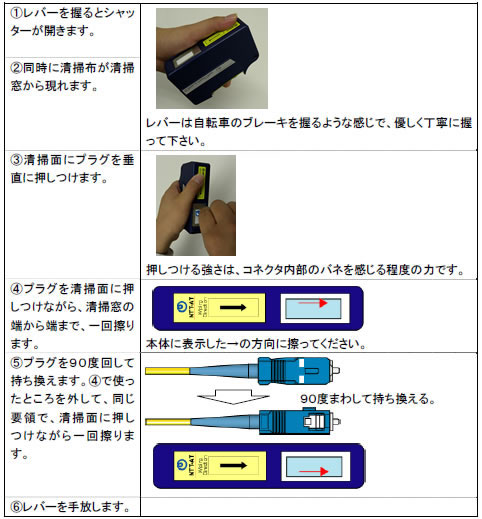
When cleaning the optical connector plug
When cleaning optical connector plugs, please use CLETOP-S or OPTIPOP R.
By simply pressing the end face of the optical connector plug against the cleaning surface of the cleaner and sliding it, anyone can easily clean the end face of the connector.
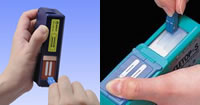
*Here, OPTIPOP R is used as an example.
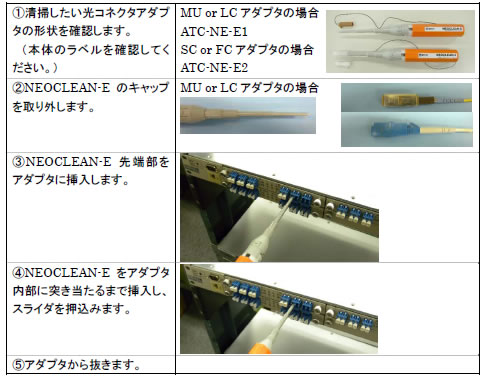
When cleaning the optical port
When cleaning the optical port (receptacle, ferrule end face behind the adapter), use the stick type CLETOPStick or NEOCLEAN-S, or the pen type NEOCLEAN-EZ or NEOCLEAN-E.
In the case of a stick, insert it into the hole of the adapter and turn the stick 2-3 times in one direction while pushing it lightly.
Pen type can be cleaned by simply inserting the tip into the hole of the adapter and pushing.
* Here, cleaning the inside of the optical connector adapter is explained as an example.
Precautions when cleaning optical connectors
Since laser light may adversely affect the human body and equipment, follow the instruction manual for the equipment when connecting or disconnecting the optical connector. Laser stop is common. In our verification, when a +18dBm (63mW) laser beam passes through, we have confirmed that the fiber melts when dirt on the optical connector crosses the core due to the wiping action of the cleaner.
Optical connector cleaner instruction manual
You can download the instruction manual for the optical connector cleaner as a PDF.