
Directional Boundary Microphone FR-1200 AC6
Bidirectional Boundary Microphone

The FR-1200 AC6 builds upon the superior sound collection performance of the previous FR-1200 model, combining a dedicated driver and control application to easily separate and utilize speaker voices from multiple directions. No development is required; separated audio can be used directly from various applications on a PC. This improves the accuracy of conversation recording, analysis, and AI integration.
Features
- Up to 6-way audio separation
It is possible to separate conversations between multiple speakers by direction and acquire each as a separate audio file.
It supports voice control in up to six directions, ensuring clear sound capture even in complex dialogue scenarios. - No development required, easy setup.
We provide virtual audio drivers and control applications.
It can be used simply by installing it on a Windows PC, and it integrates seamlessly with voice processing applications.
It can be implemented immediately on-site, even without specialized knowledge. - Voice output function to facilitate app integration
The separated audio is output in a format that is recognized as a "microphone input" on the PC (virtual microphone function).
The separated audio will be recognized on the PC as if multiple microphones were connected.
It can connect directly to various applications that use a microphone, such as Zoom, voice recognition software, and AI applications. - High-precision sound collection and noise suppression
By combining beamforming and spectral filtering technologies, ambient noise is suppressed.
It clearly captures only the voice of the target speaker, ensuring stable sound quality.
Structure and Mechanism
This product consists of the following three elements:
- Microphone device
- Virtual audio driver
- Control application (IM-ASTER Console)
On your PC, you can select audio from different directions and output the specified audio as a virtual microphone.
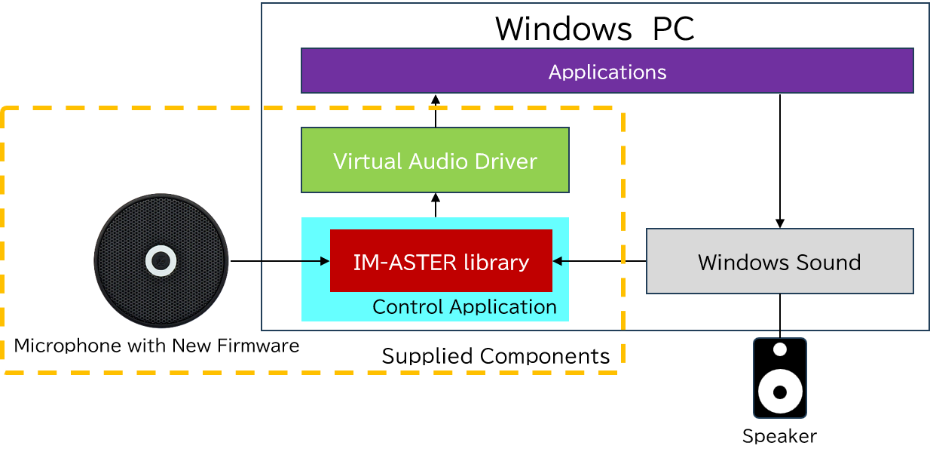
Image of the FR-1200 AC6 being installed.
It is used as a sound collection microphone for such purposes.
- Counter/In-person service
- It can separate the voices of multiple speakers by direction, allowing for accurate recording of the conversation.
- Generative AI and speech recognition integration
- High-quality voice input enhances the AI's recognition accuracy and response quality.
- Meetings
- Clear, separated audio for each speaker enables highly accurate translation of conversations.
- Multilingual communication
- Clear, separated audio for each speaker enables highly accurate translation of conversations.
How to use
No complex setup or development work is required. It can be easily used by following the steps below.
- Install the software on your PC
- Connect the microphone via USB.
- Direction setting via control app
- Select "Virtual Microphone" in the app you are using.
→ Start using it right away!
Specification
This product is sold as a set including a microphone and software. Software is not sold separately.
Microphone device
| Model | FR-1200 |
|---|---|
| Frequency response | 60~7,000Hz |
| current consumption | 100mA |
| power supply | USB bus power (DC5V) |
| External dimensions | H14.5 × φ64.7mm |
| mass | Approximately 61g (excluding cord) |
| Compatible OS | Windows 11 |
| accessories | φ3.5 stereo mini plug cord (approx. 1m) USB (AC) cord (approx. 1m) |
Virtual audio driver
|
Provided form |
BAT file |
|---|---|
|
Operating requirements |
Windows 11 |
Control applications
|
Provided form |
MSI file |
|---|---|
|
Operating requirements |
Windows 11 |